Blog · 21 November 2026
AI for tradies: from messy texts to quotes and booked jobs
AI for tradies, step by step: how a text, voice note or email becomes a drafted quote and a booked job, and what Xero, MYOB and your calendar allow.
By Andrei Satcau · Melbourne

In our view, AI for tradies helps most after the phone call, in the office work: it reads a messy text, a voice note or an email, pulls out the job, and drafts the two things that take your evenings, the quote and the booking, for you to check. Whether it can put the job straight in your calendar depends on what your calendar lets it do. As of 21 November 2026, Claude can create events in Google Calendar, and by default, outside its Auto mode, it asks for your approval before each action.
What can AI for tradies do with a messy text or voice note?
An example we made up, the kind that arrives at 7 pm:
hey mate hot water's leaking from the bottom again. can u come tues arvo or wed? also want a price to move the outside tap. thanks
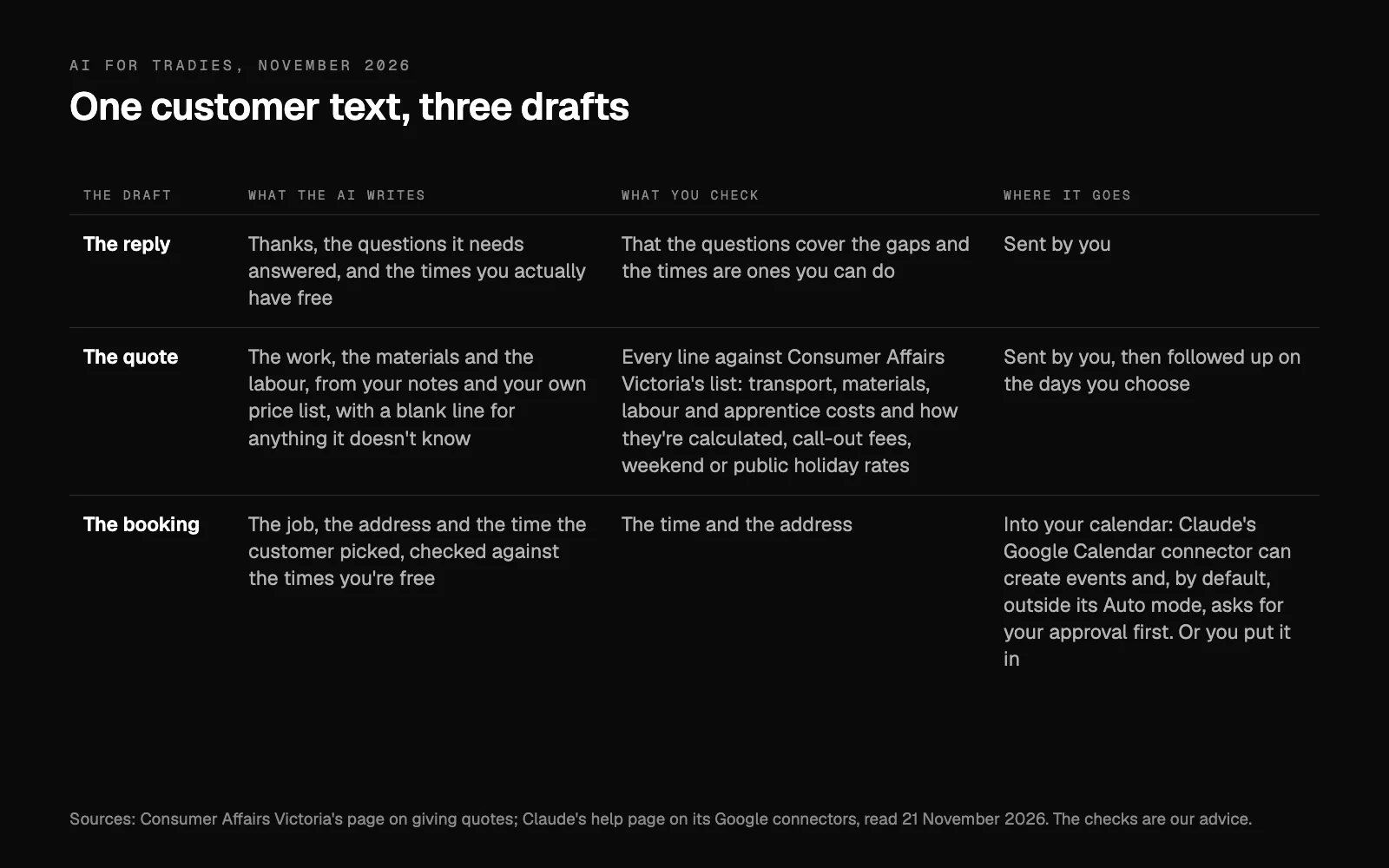
An AI assistant turns that into three drafts for you to check:
- A reply: thanks, the questions it needs answered (the address, the system's brand and age, a photo of the leak, and how to get in), and the times you actually have free.
- A quote for the second job, moving the outside tap, once it knows enough to price it.
- A booking for the leak, which has happened before, at one of the two times the customer offered.
Voice notes work the same way once they're turned into text.
It must never make up a price: prices come from your own list and past jobs, or the line stays blank for you.
How does a text become a quote you can send?
- Keep the conversation in one place: the texts, emails and voice notes about one job, together.
- Let it pull out the job and the gaps: what, where, when, and what to ask.
- Let it draft the quote from your notes and your own price list: the work, the materials and the labour, with a blank line for anything it doesn't know.
- Check it against the list further down, then send it yourself.
- Follow it up on the days you choose. Set the reminder when you send the quote; we cover how in follow up every lead.
- Book it. When the customer says yes, the booking is the second job.
How does the AI book the job into your calendar?
Once the customer says yes, the AI drafts the booking: the job, the address and the time the customer picked, checked against the times you're free. Then it goes in, by the AI where your calendar lets it, or by you.
As of 21 November 2026, Claude's Google Calendar connector can view events, create, update and delete them, and find mutual availability across attendees. By default, outside its Auto mode, every action Claude takes for you needs your explicit approval. For bookings, in our view, keep it that way. It reaches only the Google account you've connected, including calendars shared with that account.
That's how we set bookings up: your AI reads the diary and can make or move a booking, and it asks you to confirm before it changes anything (what we set up).
If your jobs live in job software too, what the AI can do there depends on what that software shares. Where it lets approved software in, your AI reads the jobs from it; where it only exports, the exports give it a daily picture. Your first plan from us says what yours allows.
Can AI put a quote into Xero or MYOB?
Not through Claude's own connections: they read. Xero says Claude can't create, edit, approve, reconcile or pay in Xero, and calls its MCP server a developer tool. MYOB says Claude or ChatGPT can retrieve information from MYOB Business but can't make changes. That still answers "who hasn't paid?", as we covered in Claude for business.
Their APIs go further, for software built on them: Xero's API lets an app you've authorised create draft quotes, and MYOB's API has a quotes endpoint apps can read and write. In our view, keep your quotes in one place and check that it connects to your accounting software, whether that's Xero, MYOB or QuickBooks.
What must a quote cover in Victoria?
Consumer Affairs Victoria's page on giving quotes asks tradespeople to be clear about what a quote covers, whether it's given verbally or in writing, and to give a careful estimate of how long the work will take. Tell the customer whether the quote includes:
- transport to and from the job, and time and transport to get materials during it;
- the cost of materials;
- labour and apprentice costs, and how they're calculated;
- call-out fees and any weekend or public holiday rates.
Before you agree to the job, the customer should know how you'll handle changes to the quote or the timeframe, delays, late payments and any concerns about quality. CAV also says to document your quote and your conversations about cost and quality. For a major domestic building contract, you must give the client a copy of the Domestic Building Consumer Guide before they sign.
So put those lines in your quote template. Ask the AI to fill them from your notes and price list and to leave blank what it doesn't know, so you see the gaps.
One more check: what you paste in. Australia's privacy regulator, the OAIC, recommends as best practice that organisations don't enter personal information into publicly available AI chatbots, and asks them to check whether a product's terms give its developer access to what they enter.
What does Shutterdre set up for a trade business?
Our AI for tradies page lists it: missed calls answered in writing, every enquiry in one list with where it stands (new, quoted, booked, paid), quotes drafted from your notes and your own prices, checked by you and followed up on the days you choose, and invoices tracked. It's set up around the phone, email and software you already use, and you approve every quote and every message to a customer. If calls are the problem, an AI receptionist picks up when you can't, takes the details and texts you the summary.
We're also building our own CRM for trade businesses. It isn't available yet. If you'd like to hear about it, book a call and ask us.
When isn't it worth setting up?
- A few quotes a week, all alike. In our view a good template may be enough.
- Prices that move every week. In our view a draft is only as good as the price list behind it, so keep the list current first.
- A calendar that's out of date. In our view an AI can only offer the times it can see, so put every job in the calendar first.
- The phone is the real problem. Start there: what an AI receptionist actually does covers its limits.
Where to start
Pick one: the quote drafts or the bookings. Run it for a fortnight with you approving every draft, and count how many went out unchanged.
If you'd like it set up for you, book a 15-minute call, or tell us how you work now and we'll send you a written plan.
Researched and drafted with AI, and checked line by line against its sources.
Questions people ask
Can AI write quotes for a trade business?
It can draft them from your notes and your own price list, leaving a line blank where it doesn't know, and you check each one before it goes. Consumer Affairs Victoria asks tradespeople to be clear about what a quote covers and to give a careful estimate of how long the work will take.
Can AI book jobs into my calendar?
Yes, where your calendar lets it. As of 21 November 2026, Claude's Google Calendar connector can create, update and delete events and find mutual availability, and by default, outside Auto mode, every action it takes for you needs your explicit approval. Whether your job software allows it depends on what it lets approved software do.
Can Claude change anything in Xero or MYOB?
Not through Claude's own connections, which read. Xero says Claude can't create, edit, approve, reconcile or pay in Xero, and MYOB says Claude or ChatGPT can retrieve information from MYOB Business but can't make changes to your data.
Is it safe to paste customer messages into ChatGPT?
Be careful. Australia's privacy regulator, the OAIC, recommends as best practice that organisations don't enter personal information into publicly available AI chatbots, and that they check whether a product's terms give its developer access to what they enter.