
Blog · 20 November 2026
Best computer for local AI in 2026: what a business needs
The best computer for local AI starts, we think, with memory: five open models' figures, Mac or Windows PC, a small team, and when not to bother.
By Andrei Satcau · Melbourne
The best computer for local AI, in our view, is first of all one with enough memory. Loading a local AI model, one you run on your own computer, typically means making room for it in that computer's memory, so memory is the first figure we check on a spec sheet, though not the only one.
Below: memory figures for five open AI models, as of 19 November 2026, what to look for on a Mac or a Windows PC, how a small team can share one computer, and when a cloud assistant makes more sense. No prices here: check each maker's Australian store.
Why memory comes first
LM Studio, a free app for running AI models on your own computer, explains that loading a model typically means making room for it in your computer's memory. Two things change how much room it needs.
- How compressed it is. A model often comes in several copies, compressed to different sizes, and smaller files give up some quality. LM Studio's advice is a 4-bit copy or higher, if your computer can run it. In Google's own table, its Gemma 4 12B model needs about 6.7 GB of GPU or TPU memory to load in 4-bit, against 26.7 GB in full 16-bit.
- How much you give it to read. Google says memory use grows with the length of your prompt and the model's answer, and that its figures may change with the app and computer you use.
LM Studio's system requirements recommend 16 GB of RAM or more, on a Mac or a Windows PC. On a PC, they also recommend a graphics card with at least 4 GB of its own memory. And they list the processors and operating systems LM Studio supports, so memory alone doesn't settle it.
The best computer for local AI, size by size
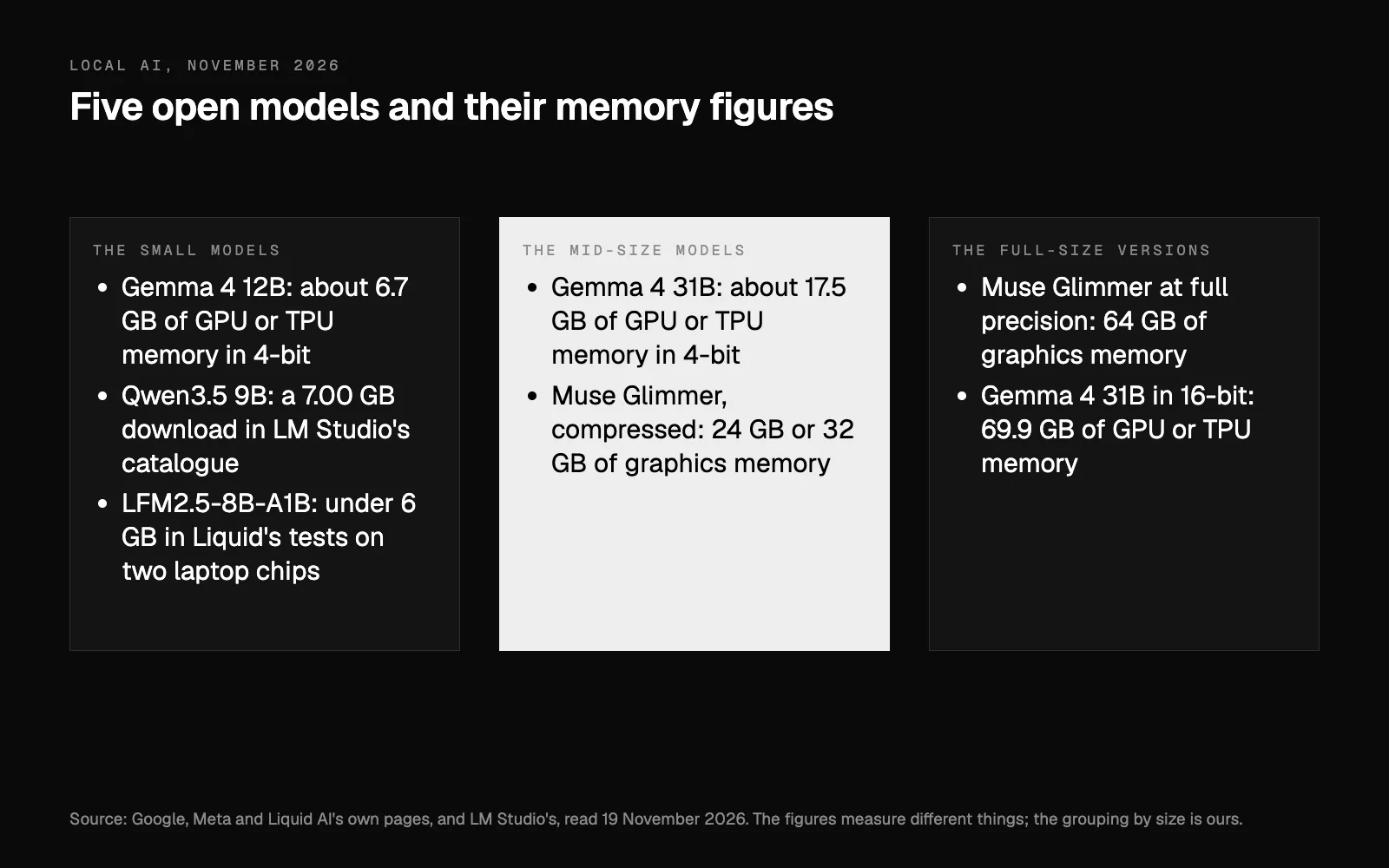
Each figure is the model maker's unless we say it's LM Studio's. They measure different things, so we say what each is; none, we think, shows on its own that a particular computer will run the model. The grouping by size is ours.
The small models.
- Gemma 4 12B, from Google: about 6.7 GB of GPU or TPU memory to load in 4-bit, in Google's table.
- Qwen3.5 9B, from Qwen: a 7.00 GB download in LM Studio's catalogue, a file size rather than a memory figure. Its model card gives no memory figure.
- LFM2.5-8B-A1B, from Liquid AI: in Liquid's tests on two laptop chips, it stayed under 6 GB.
The mid-size models.
- Gemma 4 31B, from Google: about 17.5 GB of GPU or TPU memory to load in 4-bit.
- Muse Glimmer, from Meta, released in August 2026, with 30 billion parameters. Meta compresses it to under 20 GB, which, it says, leaves room for what runs alongside it within a 24 GB or 32 GB envelope. Its table gives that target as graphics memory: 24 GB for its 17 GB version, and 32 GB for another compressed version that stays closer to the full model in Meta's tests. Separately, LM Studio lists a minimum of 26 GB of system memory.
The full-size versions. Meta names 64 GB of graphics memory for Muse Glimmer at full precision, and Google's table gives 69.9 GB of GPU or TPU memory for Gemma 4 31B in 16-bit. We don't think a small business needs these to start.
A Mac for local AI, or a Windows PC with a graphics card
On a Mac, Apple says the unified memory architecture of its M5 chip lets the entire chip use one large pool of memory. We read that as: the model shares the memory you buy with everything else you have open. Apple's Australian spec pages, as of 19 November 2026:
- MacBook Air with M5: 16 GB, configurable to 24 GB or 32 GB (specs).
- Mac mini with M6: 16 GB, configurable to 24 GB or 32 GB. With the M5 Pro: 24 GB, configurable to 48 GB or 64 GB (specs).
- Mac Studio with M5 Ultra: up to 512 GB, Apple said when it launched it in August 2026.
Apple lists the larger memory as an option you configure when you order.
On a Windows PC, what we look at first is the graphics card's own memory. On Nvidia's comparison page, the RTX 50 series cards have 8 GB (the RTX 5050 and RTX 5060), 12 GB (the RTX 5070), 16 GB or 8 GB (the RTX 5060 Ti), 16 GB (the RTX 5070 Ti and RTX 5080) and 32 GB (the RTX 5090). Of those, only the RTX 5090 reaches the 24 GB of graphics memory Meta names for Muse Glimmer.
So which? We think it comes down to what your business already uses, and how big a model you want.
A computer for a small team
You don't need a strong computer on every desk. LM Studio has a setting, Serve on Local Network, that lets other devices on the same network use a model running on one more powerful machine, and lets several people use one copy of LM Studio. LM Studio's own warning: it recommends turning on authentication, and says only to do this if you know what you're doing.
For a small team, we would put one desktop with plenty of memory in the office (a Mac mini with an M5 Pro, say, or a PC with a big graphics card) and have someone who sets up networks do it properly.
When a cloud assistant makes more sense, and when not to bother
A model on your own computer is not the best tool for every job. Google's own model card says its models do well with clear prompts and instructions, and that open-ended or highly complex tasks might be challenging. Liquid AI's model card says its model is not the best fit for two jobs: heavy programming, and answering questions that need a lot of knowledge without retrieval (looking the answers up in documents you give it).
A cloud assistant makes more sense, we think, when:
- You want AI inside your email, calendar or books. Claude, for example, can be connected to Xero, MYOB, Gmail and Outlook. Set up as in our step-by-step guide (below), a model in LM Studio sees only what you type or attach.
- The job is big and open-ended, like research or a long plan.
- Nobody in the business will look after the machine.
And we wouldn't buy a computer for local AI at all if:
- You haven't tried it yet. A small model on the computer you have will show whether it helps. Our step-by-step guide uses one free app and one small Google model. On an 8 GB Mac, LM Studio says to stick to smaller models and modest context sizes.
- Nothing you handle needs to stay on your machine. Then a cloud assistant on a business plan is the simpler choice.
- The licence doesn't fit your use. Meta says Muse Glimmer is intended for commercial and research use, and Google says Gemma models permit responsible commercial use. Liquid's licence makes commercial use conditional on you or your business not exceeding an annual revenue threshold it defines. Read the licence before you use a model at work.
Where to start
Try a small model on the computer you have first. If it earns its place and you hit the memory limit, buy for memory: in our view, 24 GB or more for one person, and one well-equipped desktop for a team.
To work out where AI fits in your business before you buy anything: as an AI consultant in Melbourne, we find what is slowing your business down, then build AI that fixes it. Your free AI plan starts with eight questions.
Researched and drafted with AI, and checked line by line against its sources.
Questions people ask
How much memory do I need to run AI locally?
LM Studio, a free app for running AI models on your computer, recommends 16 GB of RAM or more, and on a Windows PC a graphics card with at least 4 GB of its own memory. In Google's own table, its Gemma 4 12B model needs about 6.7 GB of GPU or TPU memory to load in 4-bit. Bigger models need more: Meta names 24 GB or 32 GB of graphics memory for compressed versions of its Muse Glimmer model.
Is a Mac or a Windows PC better for local AI?
Either can work, we think, and it comes down to what your business already uses. On a Mac, Apple says the unified memory of its M5 chip lets the entire chip use one large pool of memory. On a Windows PC, what we look at first is the graphics card's own memory: the RTX 50 series on Nvidia's comparison page runs from 8 GB to 32 GB.
Can my whole team use one computer for local AI?
Yes, with some setting up. LM Studio has a Serve on Local Network option that lets several people use one copy of LM Studio over the same network. LM Studio recommends turning on authentication, and says only to do it if you know what you're doing.