
Blog · 23 November 2026
Mac mini for AI: one machine or a small cluster
Mac mini for AI: what an M5 Pro with 64 GB runs, the speed tests we found, when a small cluster helps, and where Claude still does the job better.
By Andrei Satcau · Melbourne
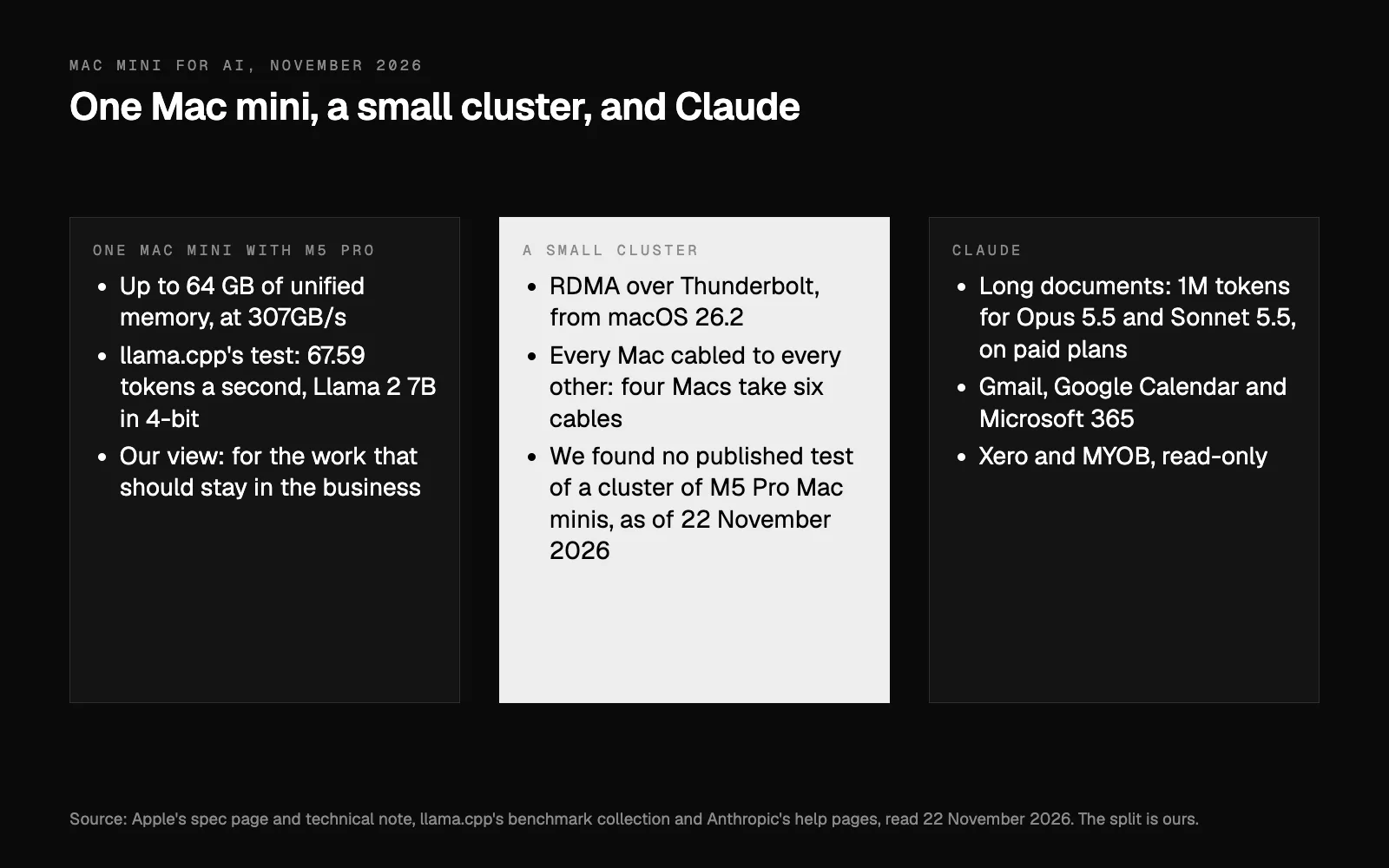
A Mac mini for AI makes most sense, in our view, as one office machine with Apple's M5 Pro chip and 64 GB of memory, running open AI models for work that should stay in the business. A small cluster can run bigger models, but the cluster tests we found are on Mac Studios. For hard reasoning, long documents and your email, calendar and books, Claude still does better, we think.
Still choosing between a Mac and a Windows PC? See our guide to the best computer for local AI.
Mac mini for AI: the machine Apple lists
Apple's Australian spec page, as of 22 November 2026, lists the Mac mini with M5 Pro with:
- Chip: a 15-core CPU and 16-core GPU, configurable to an 18-core CPU and 20-core GPU.
- Memory: 24 GB of unified memory, configurable to 48 GB or 64 GB, with 307GB/s of memory bandwidth.
- Storage: 512 GB, configurable up to 8 TB.
- Connections: three Thunderbolt 5 ports, and 2.5Gb Ethernet, configurable to 10Gb.
For an office, we would choose the 18-core chip with 64 GB, 2 TB and 10Gb Ethernet, all options at order.
Apple's spec page listed the Mac mini with M5 Pro from A$2,699 inc. GST on 22 November 2026, before options.
Two figures matter most here, in our view: memory, which the model must fit in, and bandwidth. Apple's researchers say generating each token after the first is bounded by memory bandwidth, not compute. (Tokens are the small pieces of text a model reads and writes.)
What it runs, and how fast
What fits. In Google's own table, its Gemma 4 31B model needs about 17.5 GB of GPU or TPU memory to load in 4-bit, 34.9 GB in 8-bit and 69.9 GB in 16-bit. We read that as: the 4-bit and 8-bit versions fit in 64 GB, and the 16-bit one doesn't. Google adds that memory use grows with the length of your prompt and the answer, and that its figures can change with the app and computer.
How fast, on this machine. llama.cpp's own collection of short benchmarks on Apple Silicon asks contributors to run the same test, with Llama 2 7B, a small model of 6.74 billion parameters. One entry names this machine: a Mac mini with M5 Pro (16-core GPU) and 64 GB. It wrote 67.59 tokens a second in 4-bit, 38.94 in 8-bit and 21.39 in 16-bit, and read a 512-token prompt at 1,340.44 tokens a second in 4-bit.
In the same collection, a MacBook Pro with M5 Pro and 64 GB, listed with 20 GPU cores, wrote 66.33 tokens a second in 4-bit and read the prompt at 1,620.64. The two are different computers, on different llama.cpp builds and thread counts, so we can't say what caused the difference. The summary table lists both at 307 GB/s, and we think the close writing speeds fit Apple's point about bandwidth.
Bigger models. As of 22 November 2026, we found no published test naming this machine, a bigger model, its size and the tool together. The nearest we found is Apple's own, on a MacBook Pro with the base M5 and 24 GB: with MLX, an open-source framework tuned for Apple silicon, Qwen3-30B-A3B in 4-bit had a memory demand of 17.31 GB, and its first token came in under 3 seconds from a 4,096-token prompt. That M5 has 153GB/s of bandwidth, about half the M5 Pro's.
One machine or a small cluster
Apple says Thunderbolt 5 lets you cluster multiple Mac mini systems to run large AI models entirely on device. Its technical note describes RDMA over Thunderbolt, which gives Macs cabled together low-delay links. It needs macOS 26.2 or later and a Mac with Apple silicon and Thunderbolt 5, and you switch it on in macOS Recovery.
For the lowest delay, Apple's note connects each Mac to every other: four Macs take six cables. For more Macs than ports, Apple describes a ring, with the software passing data along. It also says to turn off sleep and have them start up after a power failure.
exo, an open-source app built on MLX, connects your devices into an AI cluster to run models larger than would fit on a single device. For RDMA it needs every Mac connected to every other and cables that support Thunderbolt 5, and asks for exactly the same macOS version on each, down to the beta number. It added support for M5 Pro chips in release 1.0.69.
Each M5 Pro Mac mini has three Thunderbolt 5 ports, so, as we read those rules, four Mac minis is the most you can cable each to each.
The cluster tests we found are on Mac Studios. In December 2025, Jeff Geerling ran exo on four M3 Ultra Mac Studios that Apple gave him access to. With Qwen3 235B (8-bit, in exo's account of the test), the full cluster reached 32 tokens a second. He was using prerelease software, and wrote that it was obvious RDMA over Thunderbolt is new. As of 22 November 2026, we found no published test of a cluster of M5 Pro Mac minis.
Our view: one Mac mini first. A cluster earns its place only when a model you need won't fit in 64 GB, and even then one bigger Mac may be simpler: Apple lists the Mac Studio with M5 Ultra with up to 512 GB of unified memory.
The hybrid set-up: local models and Claude
Our set-up for a small office uses both:
- On the Mac mini: what should stay in the business. Summaries of client files, first drafts from your notes, searches over your own documents. As best practice, the OAIC, Australia's privacy regulator, recommends that organisations do not enter personal information, and particularly sensitive information, into publicly available generative AI tools. It also says the Privacy Act applies to all uses of AI involving personal information, so a local model still needs care.
- In Claude: hard reasoning, long documents and your connected tools. Google's model card says its Gemma 4 models may find open-ended or highly complex tasks challenging. On paid plans, in chat, Anthropic lists a context window of 1M tokens for Claude Opus 5.5 and Sonnet 5.5; 200,000 tokens, it says, is about 500 pages of text or more. Claude connects to Gmail, Google Calendar and Google Drive, Microsoft 365, and, read-only, Xero and MYOB (in beta).
One Mac mini can serve the office: LM Studio, an app for running AI models on your own computer, has a Serve on Local Network setting for other devices on the same network. LM Studio recommends turning on authentication, and says only to do this if you know what you're doing.
Three ways it can work, as we'd set them up:
- A clinic's notes, summarised on the Mac mini, so they never go to a cloud assistant.
- Quotes and emails, drafted in Claude. By default, outside Auto mode, Claude asks for your approval before sending from Gmail. Nothing goes live without your OK.
- A weekly report: the Mac mini summarises the private files, and Claude writes the report from those summaries and the numbers it reads from Xero or MYOB.
When not to bother
- Nothing you handle needs to stay in the office. Then Claude, set up for your business, is simpler.
- You haven't tried a local model yet. Our step-by-step guide uses one app and one small Google model on the computer you have.
- Nobody will look after it. An always-on machine needs updates, the settings above, and someone to fix it when it stops.
- You want a cluster to save money. We wouldn't. Add a machine only when a model you need won't fit.
Where to start
Want the Claude side working first? The AI Setup Session is two hours with Andrei, at your business or remotely: he sets up Claude (or ChatGPT) as your working AI, connected to your email, calendar and files. A Mac mini can come later, once you know which jobs must stay in the office.
Researched and drafted with AI, and checked line by line against its sources.
Questions people ask
Is a Mac mini good for running AI?
For open models and private work, we think so, if you buy enough memory. Apple's Mac mini with M5 Pro takes up to 64 GB of unified memory, with 307GB/s of memory bandwidth. In llama.cpp's published test, a Mac mini with M5 Pro and 64 GB wrote 67.59 tokens a second with Llama 2 7B, a small model, in 4-bit.
How much memory does a Mac mini need for AI?
In our view, enough for the model and everything else you run. In Google's own table, its Gemma 4 31B model needs about 17.5 GB of GPU or TPU memory to load in 4-bit, 34.9 GB in 8-bit and 69.9 GB in 16-bit, which is more than a 64 GB Mac mini has. Google says memory use grows with the length of your prompt and the answer.
Can you connect several Mac minis to run bigger AI models?
Yes. Apple says Thunderbolt 5 lets you cluster multiple Mac mini systems to run large AI models entirely on device, and its RDMA over Thunderbolt is available from macOS 26.2 on Macs with Thunderbolt 5. The open-source app exo uses it, and needs every Mac connected to every other Mac. As of 22 November 2026, we found no published test of a cluster of M5 Pro Mac minis.