
Blog · 25 November 2026
DGX Spark vs Mac for local AI: which suits a business
DGX Spark vs Mac for a small business: what NVIDIA's 128 GB desktop runs, how it compares with a Mac mini or Mac Studio, and when Claude is simpler.
By Andrei Satcau · Melbourne
NVIDIA's DGX Spark is a small desktop computer with up to 128 GB of memory, designed, NVIDIA says, for AI developers, researchers, data scientists and students. For a small business that wants private AI assistants on its own machine, we think a Mac is usually the simpler choice; a DGX Spark earns its place when you fine-tune AI models or build with NVIDIA's own tools.
Below, as of 24 November 2026: what it is, how fast it runs, how it compares with Apple's Mac mini and Mac Studio, and when to buy neither. No prices: in Australia, NVIDIA sells it through partners.
What NVIDIA's DGX Spark is
NVIDIA's product page and user guide give:
- The chip: the GB10 Grace Blackwell Superchip, with a 20-core Arm processor and a Blackwell graphics processor (6,144 CUDA cores) integrated.
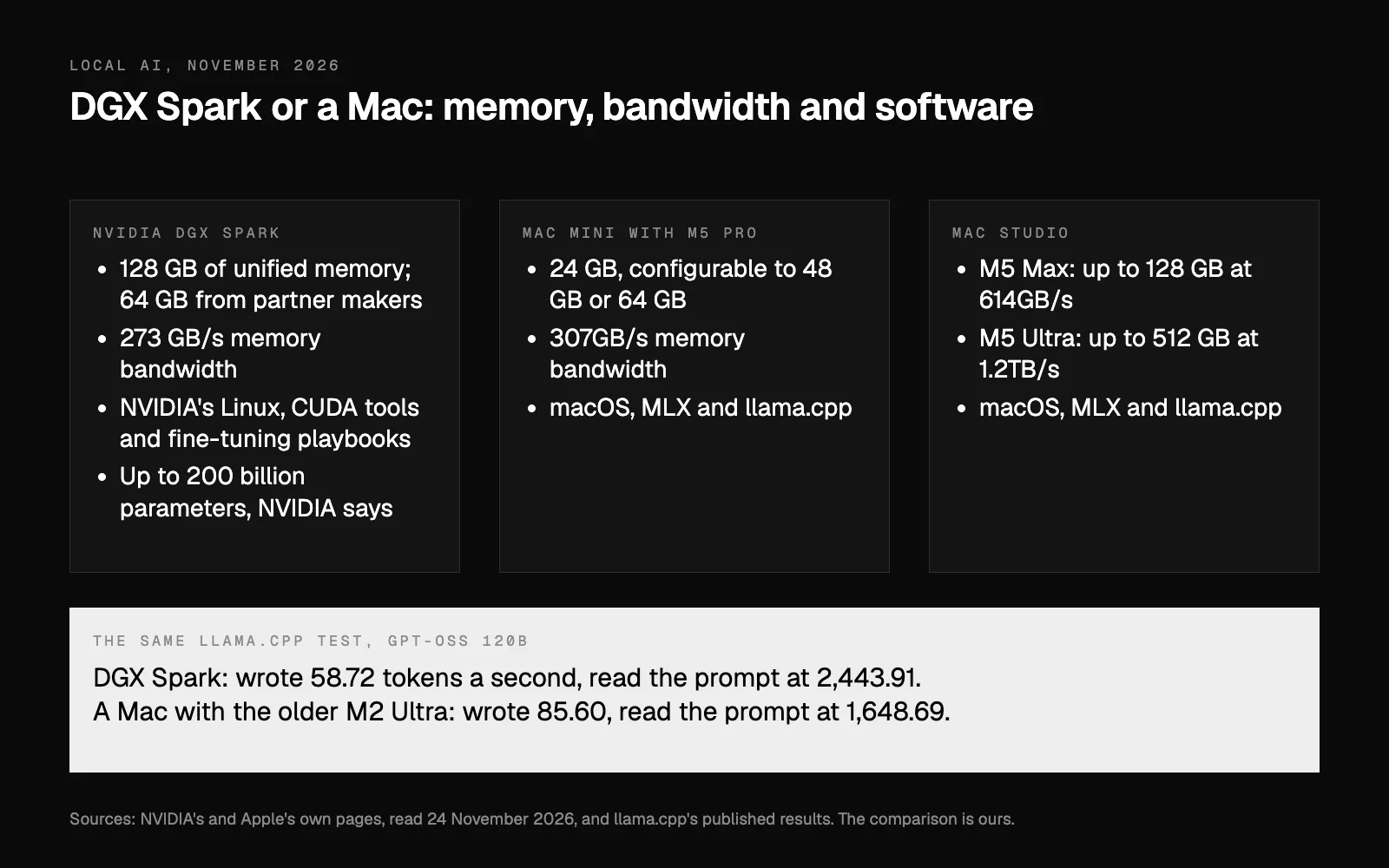
- Memory: 128 GB of unified memory at 273 GB/s. A 64 GB version is sold only through NVIDIA's partner makers.
- What it holds: on the 128 GB version, AI models of up to 200 billion parameters for running, and up to 70 billion for fine-tuning, NVIDIA says; up to 100 billion on the 64 GB version.
- AI compute: up to 1 petaFLOP at FP4, a theoretical figure using its sparsity feature, NVIDIA's footnote says.
- Software: NVIDIA's own version of Linux, based on Ubuntu, with NVIDIA's AI tools.
NVIDIA's product page says up to four can be joined over its ConnectX-7 networking: four 128 GB units give 512 GB, for models of up to 700 billion parameters, in its table.
NVIDIA's Australian page sends buyers to its authorised channel and retail partners. At launch in October 2025, NVIDIA named partner systems from Acer, ASUS, Dell, GIGABYTE, HP, Lenovo and MSI. Its FAQ says hardware support comes from the vendor that sold you the system.
What it runs, and how fast
Two things decide how a local model feels, in our view: whether it fits in memory, and how fast the computer reads your prompt and writes the answer. Apple's researchers explain the split: the first token is compute-bound, and each token after it is bounded by memory bandwidth. (Tokens are the small pieces of text a model reads and writes.)
llama.cpp's own tests. The open-source llama.cpp project publishes its DGX Spark results, naming each model, its size and the test. In its results file from February 2026, gpt-oss 120B, an open model of 116.83 billion parameters in a 59.02 GiB file, wrote 58.72 tokens a second and read a 2,048-token prompt at 2,443.91 tokens a second.
LMSYS's review, from October 2025 with the software of the time, found the Spark can load and run very large models, but that they are best suited to prototyping and experimentation rather than production: Llama 3.1 70B, in 8-bit with SGLang, wrote 2.7 tokens a second. It said the Spark truly shines with smaller models, especially when batching (handling several requests at once), and named memory bandwidth as the key bottleneck.
Different tests, but we read them together this way: parameter count alone doesn't tell you how fast a model runs here.
DGX Spark vs Mac: memory, speed and software
Apple's Australian spec pages, as of 24 November 2026, list:
- Mac mini with M5 Pro: 24 GB of unified memory, configurable to 48 GB or 64 GB, at 307GB/s (specs).
- Mac Studio with M5 Max: 36 GB at 460GB/s, configurable to 48 GB, 64 GB or 128 GB with its 40-core GPU version, at 614GB/s (specs).
- Mac Studio with M5 Ultra: 96 GB, configurable to 256 GB or 512 GB with its 36-core CPU and 80-core GPU version, at 1.2TB/s.
Memory and bandwidth. Every Mac above has more bandwidth than the Spark's 273 GB/s, which, by Apple's account, helps writing. Memory is the Spark's strength against a Mac mini: gpt-oss 120B's file alone is about 63 GB, by our arithmetic, so we wouldn't plan on it in a 64 GB Mac mini, while the Spark's 128 GB holds it. A Mac Studio can match or pass the Spark's memory.
The same test on a Mac. llama.cpp ran the same gpt-oss 120B benchmark, with the same model file, on a Mac with Apple's older M2 Ultra chip, 800 GB/s in llama.cpp's own table (its results). It wrote 85.60 tokens a second, against the Spark's 58.72, but read the prompt at 1,648.69, against the Spark's 2,443.91. We read that as Apple's split in practice: the M2 Ultra's bandwidth helps writing, and the Spark's compute helps reading.
As of 24 November 2026, we found no published result for this test on the current M5 Macs.
Software. This is the bigger difference for an office, in our view. The Spark runs NVIDIA's Linux with NVIDIA's CUDA tools, and NVIDIA's playbooks cover fine-tuning (with Unsloth or NVIDIA's NeMo) and a chat window in the browser (Ollama with Open WebUI). A Mac runs macOS, with MLX, an open-source framework for Apple silicon from Apple's machine learning research team, and llama.cpp. Some apps run on both: NVIDIA lists llama.cpp, Ollama, vLLM and LM Studio for the Spark, and Apple quotes LM Studio results for the new Mac Studio.
Serving the office. Either can serve the team from one desk. NVIDIA's Sync app connects your laptop to the Spark, which handles the model while your other computers do other work, NVIDIA says. On a Mac, LM Studio can share one machine's model over the office network, as our guide to the best computer for local AI explains.
Size, noise and power, as each maker states them. The Spark is 150 × 150 × 50.5 mm and 1.2 kg, with a 240 W power supply; NVIDIA declares a sound pressure of 13 dB at idle and 29 dB at maximum GPU load, at the operator's position. The Mac mini with M5 Pro is 12.7 × 12.7 × 5.0 cm and 0.73 kg, with 155W maximum continuous power and 5 dBA at idle. The makers measure noise differently, so we wouldn't compare them closely.
Which suits whom
Our view:
- A DGX Spark, if you fine-tune models on your own data, or build with NVIDIA's CUDA tools, and someone in the business is at home with Linux. NVIDIA pitches it for work that moves on later: to NVIDIA's DGX cloud or other NVIDIA-accelerated data centres.
- A Mac, if the job is private assistants for the office: summaries of client files, first drafts, searches over your own documents, on a machine your staff already know. A Mac mini with 64 GB for small and mid-size models; a Mac Studio for more memory or more bandwidth. Our Mac mini for AI post covers that machine.
- For a Windows office, NVIDIA's RTX Spark compact desktops are a dedicated Windows PC with a 20-core Grace processor, 6,144 CUDA cores and up to 128 GB of unified memory. On 18 November 2026, NVIDIA said ASUS, Dell and MSI models were available: check whether they are sold in Australia yet.
- Neither, if what you want is AI inside your email and books. Claude, set up for your business, connects to Xero and MYOB (read-only) and to Gmail or Outlook.
When not to bother
- You haven't tried a local model yet. Our step-by-step guide uses one app, LM Studio, and one small Google model, on the computer you have.
- Nothing you handle needs to stay in the office. Then a cloud assistant on a business plan is the simpler choice.
- Nobody will look after it. A Spark is a Linux machine: it needs someone who can keep one updated and fix it when it stops.
- You want it to pay for itself against a cloud plan. We wouldn't count on that.
Where to start
Start with the computer you have. Our private AI set-up is two hours with Andrei, at your business or remotely, starting with a check of your computer, and if it falls short, you hear that first.
Researched and drafted with AI, and checked line by line against its sources.
Questions people ask
Is a DGX Spark worth it for a small business?
In our view, only if you fine-tune AI models or build with NVIDIA's own tools. NVIDIA says the DGX Spark is designed for AI developers, researchers, data scientists and students. For private assistants in an office, a Mac is usually simpler, we think, and for AI inside your email and books, a cloud assistant such as Claude.
Does the DGX Spark run Windows?
It ships with NVIDIA's own version of Linux, based on Ubuntu, not Windows. For a Windows office, NVIDIA's RTX Spark compact desktops are a dedicated Windows PC with up to 128 GB of unified memory.
DGX Spark or Mac Studio for AI?
Apple lists the Mac Studio with M5 Ultra with up to 512 GB of unified memory at 1.2TB/s, against the DGX Spark's 128 GB at 273 GB/s, so it holds bigger models. Apple's researchers say each token a model writes after the first is bounded by memory bandwidth, but as of 24 November 2026 we found no published llama.cpp result for gpt-oss 120B on an M5 Mac. The Spark brings NVIDIA's CUDA tools and fine-tuning guides.
How big a model can a DGX Spark run?
NVIDIA says the 128 GB DGX Spark runs AI models of up to 200 billion parameters and fine-tunes models of up to 70 billion; the 64 GB version runs up to 100 billion. In llama.cpp's published test, gpt-oss 120B wrote 58.72 tokens a second on it.