
Blog · 13 November 2026
Build note: the jobs a crashed computer missed
Our Mac crashed overnight and skipped its 7:30 and 7:35 jobs. Why it didn't catch up by itself, the rule we built that day, and what to ask of your own.
By Andrei Satcau · Melbourne
Just after midnight on Thursday 12 November, the Mac that runs our business's daily jobs crashed. It stayed down until Andrei restarted it at about 7:39 in the morning, and by then it had missed two jobs: the 7:30 update of our lead list and the 7:35 morning email.
Both ran later that morning. But the night showed a gap we hadn't planned for, and the way we closed it applies to any business with things that run on a clock.
What runs on that Mac
A good part of our own daily routine runs on one Mac, on a timetable. At 7:30 every morning it copies our lead list into a shared spreadsheet. At 7:35 it sends Andrei a short morning email. At 8:55 it sends him one message saying whether every job ran when it was due. Every 15 minutes, a separate check makes sure the jobs that send our emails, read replies and pass on website chat leads are still working, and that the booking page answers.
There are others too: invoice reminders, which Andrei then sends himself, a Friday email, and a weekly plan of the times he's open for calls.
None of this is unusual. If your clinic sends appointment reminders the day before, or your salon's posts go out at a set time, something somewhere is doing the same thing on a clock.
What happened that night
The Mac crashed at about 12:30 am, three minutes into an overnight test of newer AI models on it. The likely trigger was heavy writing to its main drive while those models were being downloaded, though that isn't proven. A setting on this Mac tells it not to restart by itself after a crash, so it sat on the crash screen for about seven hours.
At 8:55 the daily check did its job and told Andrei the morning email hadn't run at 7:35. The lead list update had been missed too.
Why it didn't catch up by itself
You might expect a missed job to run as soon as the computer comes back. On a Mac, that depends on why it was missed. Apple's guide to timed jobs says a job set for a clock time that falls while the computer is asleep "will run when the computer wakes up". But "if the machine is off when the job should have run, the job does not execute until the next designated time occurs."
A Mac stuck on a crash screen is treated the same as one that is off. So the 7:30 and 7:35 jobs weren't late. As far as the Mac was concerned, they were skipped until their next time. That is how the scheduler is meant to work, and nothing in our setup allowed for it.
The fix that morning
Andrei asked for two things: fix that morning's jobs, and stop it happening again. The lead list update was run again at 8:58 and the morning email at 8:59. Both finished without an error, and the email went out.
The second part was built the same morning.
The rule we built that day
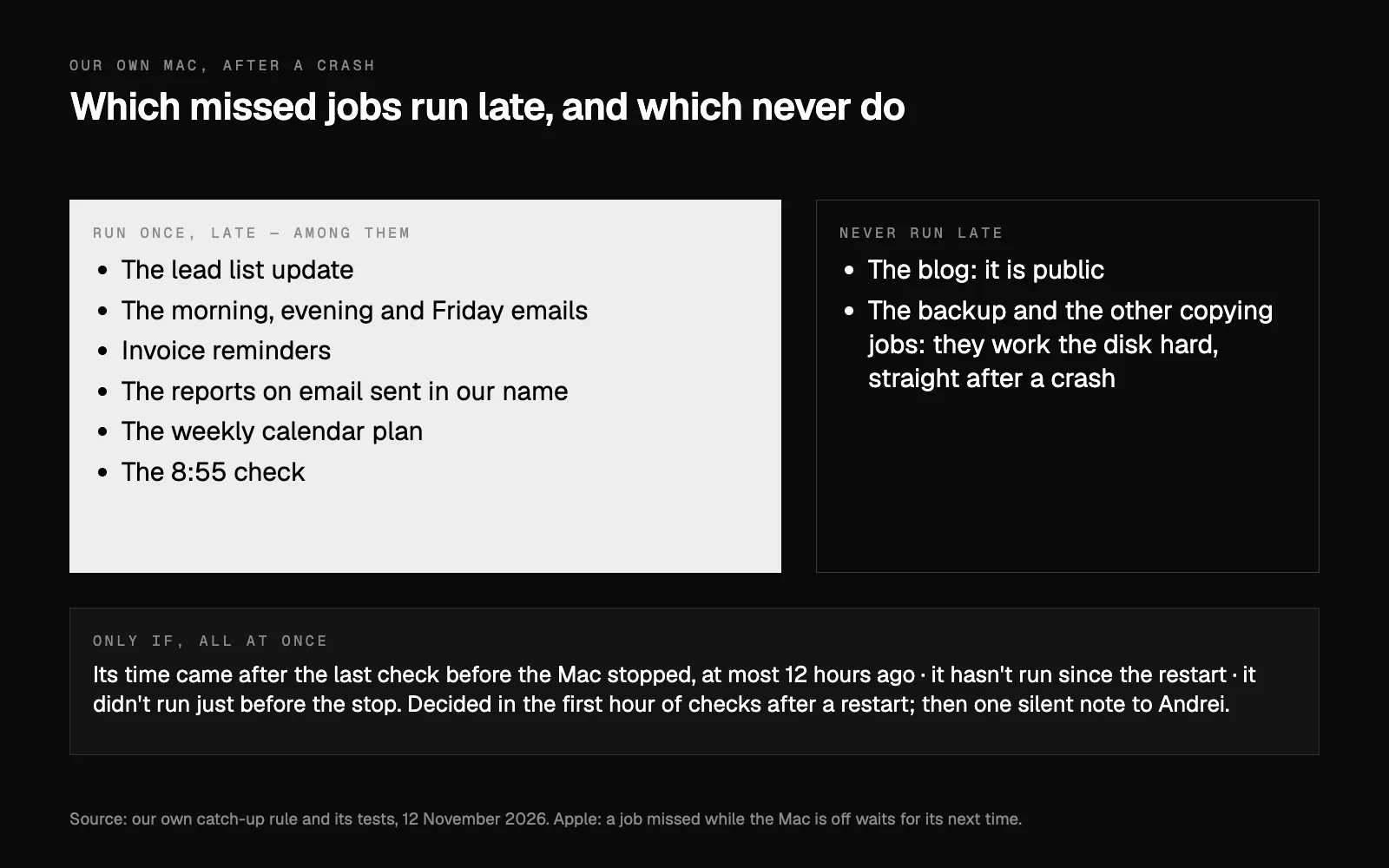
The 15-minute check now has one more task. In its first hour of checks after a restart, it looks down a short list of timed jobs. It starts a job on that list once, late, only if all of these are true:
- its time came after the last check before the Mac stopped, and at most 12 hours ago;
- it hasn't run since the restart;
- its log shows it didn't run just before the stop.
A job the Mac hasn't finished loading yet is left for a later check. Then Andrei gets one silent note saying the Mac restarted and what it ran late. If a catch-up fails, that becomes a line in the morning email, and the regular checks carry on regardless.
Which jobs are on the list matters as much as the rule. On it: the lead list update, the morning, evening and Friday emails, the invoice reminders, the reports on email sent in our name, the weekly calendar plan and the 8:55 check. Each of these writes only to Andrei, his spreadsheet or his calendar, or checks something again, which is why we judged them safe to run late.
Never on it: the blog, because it is public, and the backup and the other copying jobs, because they work the disk hard, which is the last thing you want straight after a crash. We think a public post that goes out at an odd hour after a crash, with nobody watching, is a different kind of risk from a late email to yourself.
Then there is the 12-hour limit. In our view, a job that late is better left to its next time than run at a strange hour.
How we tested it, and what isn't proven
Six new tests run it through made-up situations: that morning replayed, making sure nothing runs twice, a job switched off on purpose, a job still loading, the 12-hour limit, and a catch-up that fails. The full set of tests, 358 of them, passed. Then a dry run on the Mac's real job files, set back to how they stood at 7:40 that morning, showed it would have started exactly the two jobs that were missed.
What it hasn't had is a real restart. Our own record of the change says so: the next one is the proof. The Mac froze again that afternoon, from about 1:25 to 2:04, during another test of the AI running on it. None of the jobs on the list is timed for the early afternoon, so there was nothing to run late, and the proof is still to come. Andrei also decided that afternoon that AI tests no longer run in batches on that Mac's graphics card.
The other half of the fix isn't software. The Mac should restart by itself after a crash, instead of waiting on the crash screen for someone to come in. Without that setting, it would restart on its own, and every job would come back with it. Changing it needs Andrei's password, so it is on his own to-do list, and as of 13 November it is still there.
Three questions for your own setup
You don't need a Mac, or a setup like ours, for this to matter. If anything in your business runs on a clock (appointment reminders, invoice reminders, a daily report, a scheduled post), ask whoever set it up:
- Where does it actually run? If reminders are sent by your booking system's own servers, a crashed computer in your office won't stop them. If they depend on a computer in your office being on, it will. If you're not sure what your booking system does by itself, our guide to booking systems and AI explains what connects.
- Would you know if it didn't run? Our 8:55 check is what told us. Without something like it, a missed reminder may only show up later, as an empty chair. A short morning summary with plain-English alerts is one way to find out the same day.
- Which jobs are safe to run late, and which must never run twice? A summary email that arrives late is harmless. A payment, a text to a client or a public post that goes out twice, or at three in the morning, isn't. It is easier to decide that on a quiet day than on the morning after.
If you'd like a second pair of eyes on what runs where in your business, tell us about it or book a short call.
Researched and drafted with AI, and checked line by line against its sources.